Your Bufferbloat Test Is Lying to You
A bufferbloat test run at a quiet moment tells you almost nothing — bloat is a busy-hours problem. How latency-under-load is measured, how to read the numbers, and how NetworkTests Monitor tests it automatically, for free.
There's a particular kind of connection that drives people slowly mad: the speed test says everything is wonderful — hundreds of megabits, low ping — and yet calls break up, games rubber-band, and the whole internet turns to syrup at seemingly random moments.
Those moments aren't random. They're the moments your line is busy — someone's laptop uploading photos, a console pulling a patch, a cloud backup kicking in. And the disease has a name: bufferbloat.
To be fair to the test: it isn't actually lying. It's answering a narrower question than you think — what was my latency under load at the moment I ran it? The trouble is when that moment gets mistaken for an answer about your connection in general.
The problem with diagnosing it is that almost everyone tests at the wrong time. A bufferbloat test run on a quiet Tuesday afternoon measures a quiet Tuesday afternoon. Bloat shows up at 8 PM, when the line is loaded — which is exactly when nobody is running tests.
Thirty seconds of theory: why fast lines feel slow
Your router has buffers — queues where packets wait their turn when more data arrives than the line can carry at that instant. Buffers are necessary; the problem is their size. Many consumer routers and ISP devices have historically shipped with buffers big enough to hold multiple seconds of data, and a too-big buffer does something perverse.
When the line saturates, a well-managed router keeps its queue short — dropping or marking packets early so senders get the slow-down signal before delay builds up. An over-buffered router instead swallows everything and lets the queue grow. Nothing is lost, so your throughput still looks perfect. But every packet now waits in that queue — including the small, urgent ones. Your video call's audio frame doesn't need bandwidth; it needs to arrive now. Instead it's parked behind two seconds of cloud-backup upload.
That's bufferbloat: latency that explodes only under load. It's why a gigabit connection can feel worse than old DSL, and why the speed test — which measures throughput, the one thing bloat doesn't hurt — keeps telling you everything's fine.
How a real bufferbloat test works
The measurement itself is simple, and it's the one most speed tests skip:
- Measure latency while the line is idle. That's your baseline — say, 20 ms.
- Saturate the line with a sustained download, then a sustained upload.
- Keep measuring latency during the transfer. Not after — during.
- Compare. Idle 20 ms that becomes 400 ms under load isn't a 400-ms connection — it's a 20-ms connection with two seconds of queue in front of it.
Two numbers summarize the result: the inflation factor (loaded ÷ idle latency) and the added delay in milliseconds. A healthy line stays under about 1.5× with a few tens of milliseconds added. When latency more than doubles and the line adds hundreds of milliseconds, you have bufferbloat that will visibly hurt calls and games.
For a quick grading scheme: under +30 ms added is excellent, +30–100 ms is noticeable in fast games, +100–400 ms degrades every real-time app, and beyond that your connection effectively stops being interactive whenever anyone uses it. (Treat these as practical guidelines rather than universal pass/fail lines — your baseline latency, applications and access technology all shift where the pain starts.)
The timing problem — and the case for testing continuously
Here's the uncomfortable part: even a perfect bufferbloat test has the snapshot problem. Bloat severity depends on what your line is doing, which ISP path you're loading, and when. The evening your calls actually break up, you're in the call — not running tests.
This is one of the reasons we built NetworkTests Monitor, our free desktop app for macOS, Windows and Linux. Among everything else it watches (the full tour is here), it treats bufferbloat as a first-class measurement:
- Every speed test measures latency under load. The test records your idle latency, then keeps probing while the download and upload saturate the line, and reports the median loaded latency and the inflation factor — e.g. "bufferbloat 2.2× — latency inflates 82 → 180 ms under load."
- It tests automatically, twice a day — against the nearest of our test servers — so you build up repeated readings across days without ever remembering to test. Run one on demand any time from the Overview page (a test during your busy evening hours is the most honest reading your line will ever give you).
- It raises a plain-English verdict when it finds bloat. When loaded latency reaches at least twice idle and adds more than 200 ms, you get an event and a notification: "Your connection becomes highly delayed when downloading/uploading" — with the likely fix named right in the message.
- The evidence survives. Bufferbloat findings land in the event timeline and in the exportable PDF report alongside your latency, loss and per-application charts — useful when you're trying to determine whether the problem is local, and valuable when you're asking your ISP about a recurring upstream issue.
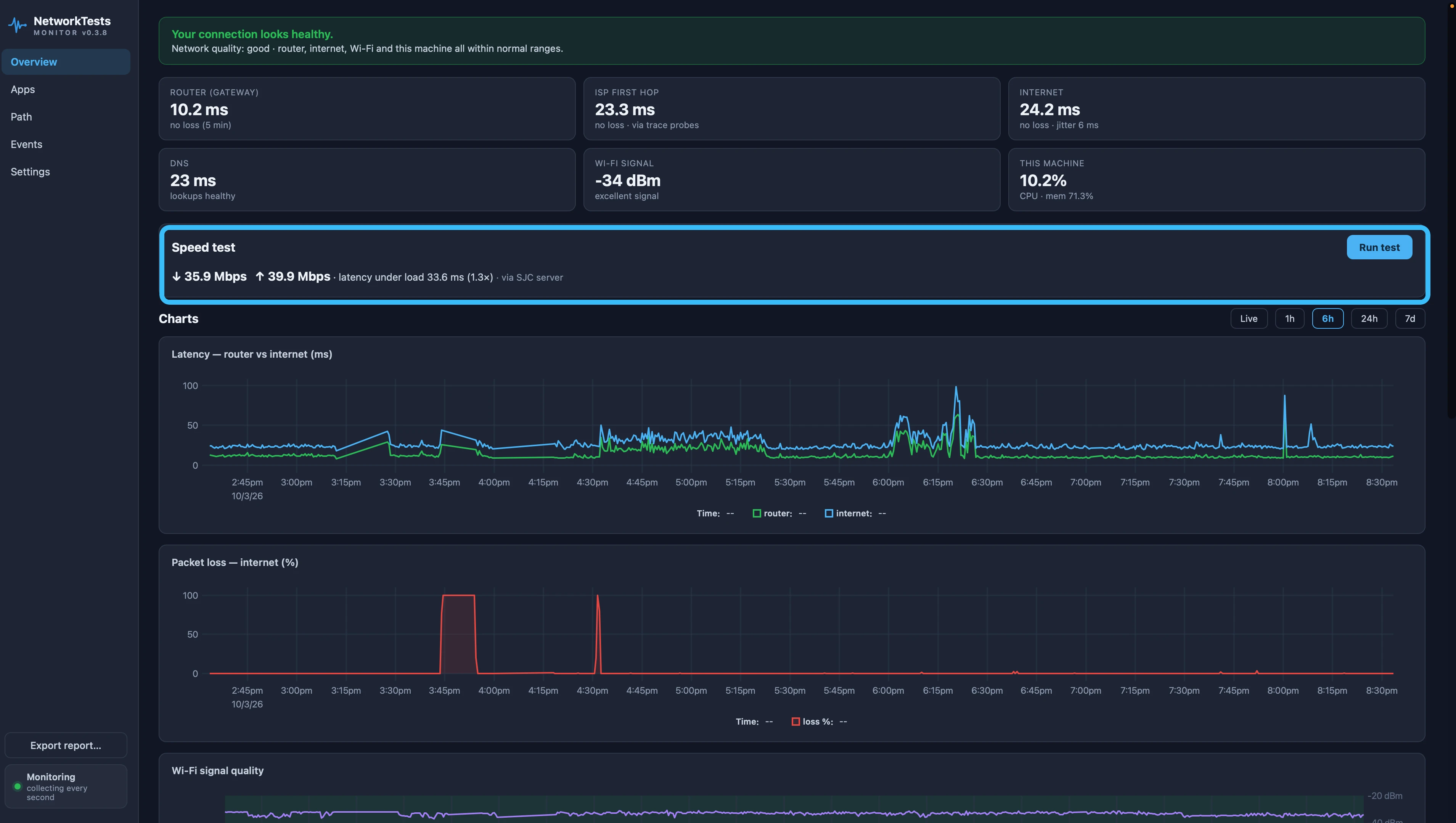
And because Monitor is also watching your latency, jitter and per-app response times continuously, the symptoms of bloat get caught too: when your apps all degrade in the same minutes that the line's throughput spikes, the correlation is sitting right there in the charts.
Test your connection under load — automatically
NetworkTests Monitor is free for personal use. It continuously records latency, packet loss and application health, and measures latency under load automatically. No account; your monitoring history stays on your machine.
You found bufferbloat. Now what?
The good news: of all the ways a connection can be bad, bufferbloat is the most fixable — usually in one evening, without changing ISPs or plans.
The fix is SQM (Smart Queue Management) — modern queueing algorithms like fq_codel and CAKE that keep the queue short by design, so urgent packets never wait behind bulk transfers. It lives in your router's settings (natively on OpenWrt and many prosumer routers; as "QoS" with varying honesty elsewhere), and configuring it correctly takes about fifteen minutes.
We've written the complete walkthrough separately: How to Fix Bufferbloat — choosing SQM settings, setting bandwidth limits that actually work, and the gotchas that make people think SQM "didn't work."
After you've changed anything, the verification loop is the same measurement in reverse: run another test in Monitor and watch the inflation factor. A properly tuned line holds its loaded latency within a few tens of milliseconds of idle — and because Monitor keeps testing automatically, over the following days you'll see whether the fix holds up under real-world load, not just under the test you ran at midnight.
Seeing the opposite symptom — speed tests look great but calls still break up? That's the same family of problem viewed from the application side: Your Speed Test Says 500 Mbps. Your Calls Still Drop.
The takeaway
A bufferbloat number from one quiet moment is a weather report from last Tuesday. Measure latency under load, measure it at the hours that hurt, and keep the receipts. Your "fast but awful" connection has a specific, diagnosable, fixable disease — you just need a test that's awake when the symptoms are.
More guides
NetworkTests Monitor — Continuous Monitoring That Names the Culprit
Free network monitoring for Windows, Mac and Linux. Continuously monitor packet loss, Wi-Fi, latency, applications and bufferbloat, identify where problems start, and export PDF evidence reports.
What Wi-Fi Actually Costs You
Wi-Fi rarely costs you bandwidth. It costs you consistency — and that is what breaks calls and games. How to measure the real difference on your own connection.
Why Your VPN Slows Everything Down
Encryption is rarely the reason a VPN is slow on modern hardware. Distance, a busy exit server and MTU are — and MTU is the one that makes some sites hang forever while everything else works.
What Your IP Address Actually Reveals
What someone can and cannot learn from your IP address, why geolocation is so often wrong, and how to tell whether you are behind carrier-grade NAT.