Understanding VPNs & VPN Detection
What Is a VPN?
A Virtual Private Network (VPN) is a technology that creates a secure and encrypted connection between your device and a remote server over the Internet. Instead of sending your data directly to websites or services, all of your network traffic first passes through this encrypted tunnel to the VPN server.
Because the data traveling through this tunnel is encrypted, third parties such as your Internet Service Provider (ISP), network administrators, or potential attackers on the same network cannot see the actual contents of your traffic. They can only observe encrypted data being sent to the VPN server.
From the perspective of websites and online services, your traffic appears to originate from the VPN server rather than your own device. As a result, your real IP address remains hidden, and your apparent location becomes the location of the VPN server.
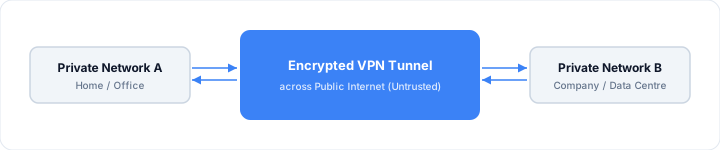
Encryption ensures that even if someone intercepts traffic in transit — an ISP, a government, or an attacker on the same Wi-Fi — all they see is random, unreadable ciphertext. They cannot determine which websites you are visiting or what data you are sending.
🌐 VPN vs Proxy vs Tor
Why Do We Need a VPN?
The internet is a public network where data travels through many intermediate routers before reaching its destination. Without encryption, that data can be intercepted, logged, or modified at any point. VPNs address this by providing:
- • Protection of sensitive data in transit
- • Secure remote access to private networks
- • Connectivity between geographically distributed networks
- • Privacy by masking your real IP address and location
2.1 Remote Access VPN
Scenario: A home user needs to access their company's internal network securely. The home network is private, the company data centre is private, and the internet between them is public and untrusted.

The VPN client on the user's laptop establishes a tunnel to the company's VPN gateway. Once connected, the laptop behaves as if it is physically on the company network — accessing file servers, internal tools, and databases as normal.
2.2 Site-to-Site VPN
Scenario: Multiple branch offices need permanent, secure connectivity to headquarters. Routers at each site handle the tunnel automatically — no client software is required on individual devices.
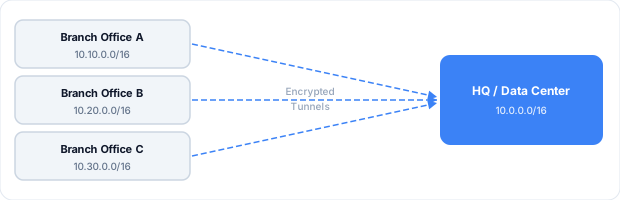
All offices share the same logical private network across the public internet. Users at any branch can reach resources at HQ or other branches as if they were all on the same LAN.
2.3 Consumer VPN (Privacy & Location Masking)
Use cases: Privacy from ISPs, location masking, accessing geo-restricted content, security on public Wi-Fi.

The website or streaming service sees the VPN server's IP address — not the user's real IP. From the service's perspective, the user appears to be in whatever country the VPN server is located.
Private vs Public Networks
Private Networks
Private networks use IP address ranges defined in RFC 1918 — these addresses are not routable on the public internet and are used exclusively within homes, offices, and data centres.
| Range | CIDR | Common Use |
|---|---|---|
| 10.0.0.0 – 10.255.255.255 | 10.0.0.0/8 | Large enterprise networks, data centres |
| 172.16.0.0 – 172.31.255.255 | 172.16.0.0/12 | Medium-sized corporate networks |
| 192.168.0.0 – 192.168.255.255 | 192.168.0.0/16 | Home routers, small office networks |
- • Not routable on the public internet — cannot be reached directly from outside
- • Hidden behind NAT (Network Address Translation) at the router
- • Used in homes, offices, and data centres for internal addressing
Public Networks
Public networks use globally routable IP addresses — assigned by regional internet registries and reachable from anywhere on the internet. Examples include public websites, cloud-hosted applications, and internet-facing servers.

How a VPN Works
When you connect to a VPN, two things happen simultaneously: your traffic is tunnelled through a secure connection to the VPN server, and it is encrypted so nobody can read it in transit.
4.1 Tunneling
Tunneling wraps your original network packets inside new packets addressed to the VPN server. Your device sends everything to the VPN server first; the server unwraps the packets and forwards them to their real destination on your behalf.
| Step | Without VPN | With VPN |
|---|---|---|
| 1 | Your device → website | Your device → VPN server (encrypted) |
| 2 | ISP sees your request | ISP sees only encrypted data to VPN server |
| 3 | Website sees your real IP | VPN server → website (using VPN server's IP) |
| 4 | Website responds to you | Website responds to VPN server → tunnelled back to you |
4.2 Encryption
Modern VPNs use AES-256 symmetric encryption for the data channel — the same standard used by banks and governments. The initial handshake uses asymmetric cryptography (RSA or Elliptic Curve Diffie-Hellman) to securely establish a shared session key without transmitting it over the network.
🔑 Perfect Forward Secrecy
Types of VPN Technologies
VPN is a broad term covering several distinct technologies. Here is a comparison of the main types:
| VPN Type | Layer | Encrypted | Primary Use Case |
|---|---|---|---|
| IPsec | L3 | Yes | Site-to-Site connectivity |
| GRE | L3 | No | Encapsulation / routing protocols |
| SSL / TLS | L7 | Yes | Remote user access |
| MPLS VPN | L2/L3 | No* | Service provider WAN |
| WireGuard | L3 | Yes | Modern consumer & corporate VPN |
| OpenVPN | L3 | Yes | Cross-platform remote access |
IPsec VPN
Most widely deployedOperates at Layer 3 (Network Layer). Provides strong encryption and authentication and is the foundation of most site-to-site VPNs. Typically used to connect branch offices to a data centre over the internet. Supported natively by most enterprise routers and firewalls.
GRE (Generic Routing Encapsulation)
No encryptionAn encapsulation protocol — not an encryption protocol. GRE wraps packets to support routing protocols and multicast traffic across the tunnel. Almost always combined with IPsec (GRE over IPsec) to add encryption. Alone, GRE traffic is plaintext.
SSL / TLS VPN
Remote accessOperates over encrypted TLS on port 443, making it nearly impossible to block — traffic appears identical to normal HTTPS. Two modes: TLS (TCP-based, reliable) and DTLS (UDP-based, lower latency and better for real-time traffic). Used by modern consumer VPN clients and many corporate remote-access solutions.
MPLS VPN
Service providerUsed by telecommunication service providers to offer managed WAN services to enterprises. Operates over the provider's private backbone — not the public internet. Traffic is label-switched rather than IP-routed. Comes in Layer 2 VPN and Layer 3 VPN forms. MPLS does not encrypt traffic — confidentiality relies on the provider's private infrastructure.
WireGuard
Modern protocolA modern open-source VPN protocol with a lean codebase (~4,000 lines). Uses state-of-the-art cryptography: ChaCha20 for encryption, Poly1305 for authentication, Curve25519 for key exchange. Much faster than OpenVPN and simpler to configure. Used by Mullvad, ProtonVPN, NordVPN (NordLynx), and many others.
OpenVPN
Widely supportedA battle-tested open-source VPN protocol using OpenSSL for encryption. Highly configurable and available on every major platform. Can be tunnelled over TCP port 443 to mimic HTTPS traffic, helping bypass censorship. Slower than WireGuard but very mature and trusted.
Benefits of VPN
| Benefit | Description |
|---|---|
| Secure communication | Encrypts data in transit, preventing attackers, ISPs, and governments from reading your traffic. |
| Remote work enablement | Employees securely access internal company applications, file servers, and databases from anywhere. |
| Network connectivity | Connects multiple offices, data centres, and cloud environments into a single logical private network. |
| Privacy protection | Masks your real IP address and browsing activity from websites, advertisers, and your ISP. |
| Censorship bypass | Encrypted VPN traffic bypasses content filtering and censorship imposed by ISPs or governments. |
| Geo-restriction bypass | Appear to be in a different country by connecting through a VPN server there, unlocking region-locked content. |
Consumer VPNs
Consumer VPN services (NordVPN, ExpressVPN, Surfshark, Mullvad, ProtonVPN, and others) have grown significantly in popularity as awareness of online privacy has increased. They offer three core features:
IP Address Masking
Your real IP address is replaced by the VPN server's IP. Websites, services, and trackers see the server's IP — making it much harder to link your activity to your identity or location.
Location Masking
The VPN server's geographic location is what websites detect. Connecting through a server in Germany makes you appear to be in Germany regardless of where you physically are.
Geo-Restricted Content
Streaming services restrict content by country. By routing traffic through a VPN server in the required country, you can access region-locked libraries and services.
⚠️ You must trust your VPN provider
Security Considerations
VPNs provide two primary security benefits: encryption of traffic in transit and hiding of the user's identity and location. Both are valuable, but they are not the complete picture of modern network security.
Encryption
Traffic between your device and the VPN server is encrypted with AES-256 or ChaCha20. Even if intercepted, the data is unreadable without the decryption key — protecting against packet sniffing on shared networks and ISP surveillance.
IP Address Hiding
Websites and services see the VPN server's IP, not yours. This prevents IP-based tracking, geolocation targeting, and identity correlation. However, websites can still track you through cookies and browser fingerprinting regardless of VPN use.
⚠️ A VPN alone does not provide complete security
Modern security architectures require far more than a VPN tunnel. Traditional VPN gateways grant broad network access once connected — any compromised device on the VPN can reach everything. Advanced architectures address this with:
- •Zero Trust Network Access (ZTNA)— never trust, always verify. Every request is authenticated and authorised regardless of network location.
- •Traffic inspection— deep packet inspection and SSL/TLS inspection to detect malware and data exfiltration within encrypted tunnels.
- •Application-level access control— users access only specific applications, not the entire network.
- •Least-privilege access— users are granted only the minimum permissions needed for their role.
How This Tool Detects VPNs
This tool uses five independent signals to determine whether your connection is going through a VPN, producing a verdict of None, Possible, or Detected.
| Signal | How it works | Confidence |
|---|---|---|
| Known VPN provider | The organisation name of your IP is matched against a list of 30+ known VPN providers. If the owner is a VPN company by name, this signal fires. | High |
| Reputation database | Your IP is checked against proxycheck.io, which maintains a continuously updated database of known VPN exit nodes, proxy servers, and Tor exit relays. | Medium–High |
| Datacenter IP | VPN exit nodes are typically hosted in datacenters (AWS, Azure, Hetzner, OVH, etc.) rather than residential ISPs. Alone this is a weak signal — it may indicate a VPN, corporate proxy, or cloud workspace. | Low (alone) |
| WebRTC IP leak | Your browser gathers ICE candidates via WebRTC STUN. If the STUN-reflexive IP differs from the server-reported IP, your VPN is leaking your real address. | High (if leaked) |
| Cellular IPv6 / NAT | Cellular carriers assign native IPv6 to devices but NAT outbound IPv4 traffic (CLAT/464XLAT), which can produce a version or prefix mismatch between the server-reported IP and WebRTC IPs. The tool cross-checks both IPs against their ASN — if they belong to the same network operator, the mismatch is a normal carrier artefact and any reputation-database flags are overridden. | Clears false positives |
🧮 Confidence scoring logic
Possible — the reputation database flagged the IP but it also belongs to a datacenter (common false positive for Azure, AWS, GCP), or a datacenter IP with no other signals. Also shown when carrier NAT is confirmed but other weak signals remain.
None — no signals triggered, or cellular carrier confirmed: WebRTC IPs matched the same ASN as the server-reported IP, or CLAT/464XLAT was detected — confirming a legitimate cellular connection and overriding reputation-database flags.
Detection Limitations
No VPN detection system is perfect. This tool uses best-effort heuristics and will produce false positives and false negatives in some situations.
Residential IP VPNs — not detected
Some VPN providers source exit IPs from residential ISPs, making them indistinguishable from a regular home connection. No IP-based detection method can reliably identify these.
Split-tunnel VPNs — partial only
Split-tunnel VPNs route only some traffic through the tunnel. If browser traffic is excluded, your real IP is visible to this tool even though a VPN is active for other apps.
WebRTC blocked — inconclusive
Some VPN clients and browsers block WebRTC to prevent leaks. If WebRTC is blocked, the leak signal returns no result — not a confirmation that no VPN is in use.
Cloud workspaces — false positive
Users on virtual desktops (Azure Virtual Desktop, AWS WorkSpaces) appear to connect from a datacenter IP and may be flagged as 'Possible VPN' when no VPN is involved.
Obfuscated VPNs — harder to detect
VPN providers targeting censorship-heavy regions use IPs not publicly associated with VPN services and rotate them frequently, reducing reputation database effectiveness.
Tor exit nodes — detected as proxy
Tor exit node IPs are well-documented and flagged by reputation databases. Tor users will likely see a 'Detected' result classified as a proxy or anonymisation service.
Understanding how VPNs work is an important foundation for anyone interested in networking, cybersecurity, or cloud infrastructure. VPNs are powerful tools for secure connectivity and privacy — but they work best as part of a broader security architecture that includes Zero Trust access controls, traffic inspection, and least-privilege principles.